Chiron-Studios
Chiron's Disk Blaster
Chiron's Disk Blaster
Couldn't load pickup availability
Share
Chiron's Disk Blaster is a slick front-end for Greaseweazle, ZoomFloppy and even standard USB Floppy Drives!
Also buy the offical t-shirt!
https://www.chiron-studios.com/products/chirons-disk-blaster-grey-or-gold-dryblend%C2%AE-t-shirt
Chiron's Disk Blaster is an modern, Windows 11, desktop application for people who want to read and write real floppy disks for vintage computers using a clean and simple interface. It serves as a front-end for Greaseweazle, ZoomFloppy and even standard USB Floppy Drives, allowing the user to use one application across multiple solutions.
It's open-source and you can download the source and release on the GitHub:
https://github.com/chironb/ChironsDiskBlaster
It also provides enhanced support by converting files to and from whatever is needed by Greaseweazle. For example the ATR and 2MG are supported by converting the formats are not directedly supported by Greaseweazle using CiderPress2. You just have to show Chiron's Disk Blaster where to find your local installation of the various external tools used to bring it all together.
It provides relief from knowing and navigating all the complicated details around programs like Greaseweazle host tools and ZoomFloppy with OpenCBM. Unlike other GUIs, this program doesn't just show a bunch of controls for each and every command-line option. Instead it figures out a lot of the details for you, and if you try to do something that doesn't work, it'll prompt you before you do and actually try to make a disk.
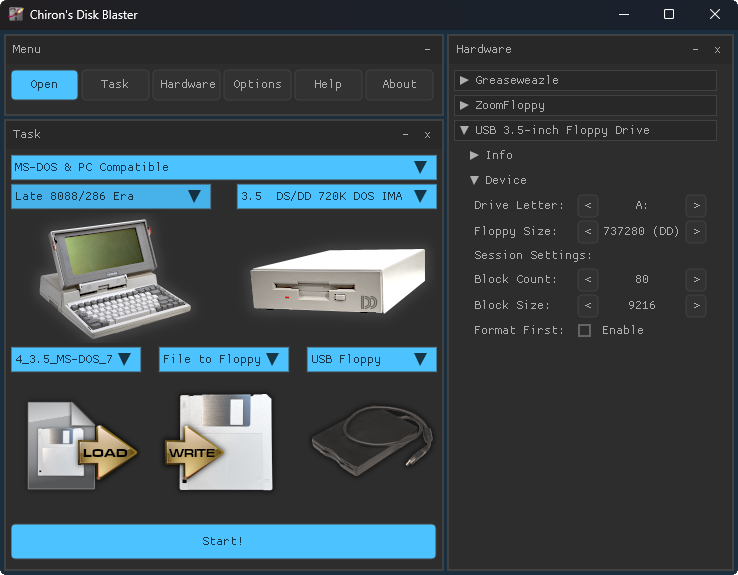
When you open or drag-and-drop a file onto the app it will identify the format automatically and set the family, computer, and drive. For the rare file that is genuinely ambiguous it will prompt you to clarify. A couple of clicks to tell it about your hardware and it's ready to read or a write a disk!
The interface also has visual icons and elements that make it clear what you're doing. It shows the computer, a real world drive, an icon that shows the disk image file and what kind of floppy it's intended for, a read/write icon that shows direction information is flowing, and a hardware icon that embeds pictures of the current hardware settings. This gives you the ability of at-a-glance checking that you've correctly setup your job.
Chiron's Disk Blaster supports a wide range of systems:
Commodore 8-Bit: PET / VIC-20 / 64 / 128 / and their CBM drives, Amiga, Apple II, Apple IIGS, and classic Macintosh, Atari 8-bit, Atari ST, BBC Micro, Acorn Archimedes, Dragon; Tandy CoCo, Olivetti, and standard MS-DOS / PC compatible formats.
Keyboard shortcuts, configurable paths for all external tools, and smart safety checks, like preventing a format-first wipe when you meant to read a disk, keep things moving without gotchas.
Please note: This software is a front-end GUI for Greaseweazle, ZoomFloppy and even standard USB Floppy Drives. As of my launching this Beta v0.01 version it does not currently support all the formats that Greaseweazle supports. This is due to time, testing, and finding open-source compatible images to use. Also, if you do not own at least one of these hardware and software solutions then this program is of limited utility. The kinds of formats you can read and write is dependent on your hardware. Greaseweazle is the most flexible and supports the most formats. ZoomFloppy supports a large but still specific set of Commodore compatible drives. USB Floppy Drives only support MS-DOS 3.5-inch formats and does not support other formats at this time. Thank you for understanding these external dependencies!